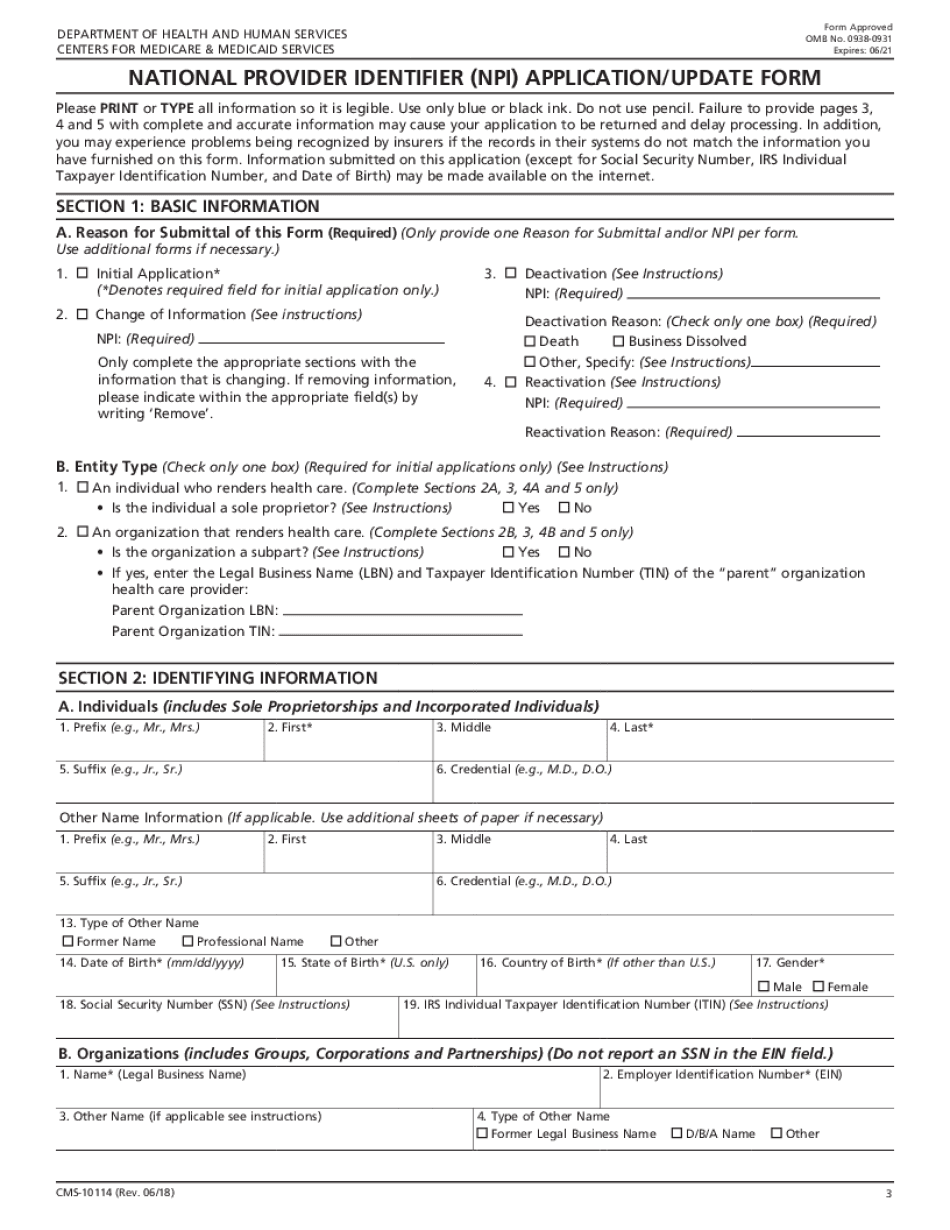
INSTRUCTIONS for COMPLETING the NATIONAL PROVIDER IDENTIFIER Form


Instructions for Completing the National Provider Identifier
Completing the national provider identifier application form (NPI) requires attention to detail and adherence to specific guidelines. The form is designed to collect essential information about healthcare providers, ensuring that they are properly identified within the healthcare system. When filling out the application, ensure that all fields are accurately completed, including your legal name, business address, and taxonomy codes. Each section must be filled out according to the instructions provided, as incomplete or inaccurate applications can lead to delays in processing.
Key Elements of the National Provider Identifier Application
The NPI application form consists of several key elements that must be addressed to ensure a successful application. Important components include:
- Provider Information: This includes your name, date of birth, and social security number.
- Practice Location: Provide the address where you primarily conduct your business.
- Taxonomy Codes: These codes classify your specialty and services, which are crucial for proper identification.
- Contact Information: Ensure that your phone number and email address are current for communication purposes.
Eligibility Criteria for NPI Application
To apply for an NPI number, you must meet certain eligibility criteria. These criteria include being a healthcare provider, such as a physician, nurse practitioner, or other licensed professional. Additionally, organizations that provide healthcare services, like hospitals or clinics, can also apply. It's important to verify that you hold the necessary licenses and certifications to practice in your state, as these documents may be required during the application process.
Application Process and Approval Time
The application process for obtaining an NPI number can be completed online or via mail. To apply online, visit the National Plan and Provider Enumeration System (NPPES) website and follow the prompts to fill out the NPI online application form. After submission, the approval time can vary, but most applications are processed within ten business days. If there are any discrepancies or additional information needed, this may extend the approval timeline.
Form Submission Methods
You can submit the national provider identifier application form through various methods. The most efficient way is to complete the NPI online application form on the NPPES website. Alternatively, you can download the paper application, fill it out, and mail it to the designated address. Ensure that you keep a copy of your application for your records, regardless of the submission method chosen.
Legal Use of the National Provider Identifier
The NPI number is a legal requirement for healthcare providers in the United States. It is used for billing and identification purposes in various healthcare transactions. Ensuring that your NPI is correctly registered and maintained is crucial for compliance with federal regulations. Misuse or failure to obtain an NPI can result in penalties or delays in receiving reimbursements from insurance providers.
Quick guide on how to complete instructions for completing the national provider identifier
Easily Prepare INSTRUCTIONS FOR COMPLETING THE NATIONAL PROVIDER IDENTIFIER on Any Device
Digital document management has become increasingly favored among businesses and individuals. It serves as an excellent eco-friendly substitute for conventional printed and signed documentation, allowing you to obtain the required form and securely store it online. airSlate SignNow provides all the necessary tools to swiftly create, modify, and eSign your documents without complications. Manage INSTRUCTIONS FOR COMPLETING THE NATIONAL PROVIDER IDENTIFIER across any platform with the airSlate SignNow apps for Android or iOS, and enhance any document-related process today.
How to Modify and eSign INSTRUCTIONS FOR COMPLETING THE NATIONAL PROVIDER IDENTIFIER Effortlessly
- Locate INSTRUCTIONS FOR COMPLETING THE NATIONAL PROVIDER IDENTIFIER and click Get Form to begin.
- Use the tools available to fill out your form.
- Emphasize important sections of your documents or redact confidential information with specialized tools provided by airSlate SignNow.
- Create your eSignature using the Sign feature, which only takes a few seconds and has the same legal validity as a traditional handwritten signature.
- Review all the details, then click the Done button to save your modifications.
- Select how you would like to share your form, either via email, text message (SMS), invite link, or download it to your computer.
Eliminate the stress of lost or misdirected files, tedious form searches, or mistakes that necessitate printing additional document copies. airSlate SignNow fulfills all your document management needs with just a few clicks from any device of your preference. Adjust and eSign INSTRUCTIONS FOR COMPLETING THE NATIONAL PROVIDER IDENTIFIER to ensure effective communication at every step of your document preparation journey with airSlate SignNow.
Create this form in 5 minutes or less
Create this form in 5 minutes!
How to create an eSignature for the instructions for completing the national provider identifier
How to create an electronic signature for your PDF online
How to create an electronic signature for your PDF in Google Chrome
How to generate an electronic signature for signing PDFs in Gmail
The way to create an e-signature straight from your smartphone
How to create an electronic signature for a PDF on iOS
The way to create an e-signature for a PDF document on Android
People also ask
-
What are the basic INSTRUCTIONS FOR COMPLETING THE NATIONAL PROVIDER IDENTIFIER application?
To complete the National Provider Identifier (NPI) application, you need to gather personal and business information, including your social security number, tax identification number, and practice locations. Follow the INSTRUCTIONS FOR COMPLETING THE NATIONAL PROVIDER IDENTIFIER carefully to ensure all required fields are accurately filled out. This will help streamline the process and avoid delays in obtaining your NPI.
-
Are there any costs associated with obtaining the National Provider Identifier?
No, there are no fees for applying for a National Provider Identifier. The INSTRUCTIONS FOR COMPLETING THE NATIONAL PROVIDER IDENTIFIER application process are free, allowing healthcare providers to register without incurring any costs. Make sure to follow the guidelines thoroughly to ensure a smooth application process.
-
How can airSlate SignNow assist with the NPI application process?
airSlate SignNow simplifies the process of eSigning and sending documents necessary for your NPI application. With our platform, you can easily access the INSTRUCTIONS FOR COMPLETING THE NATIONAL PROVIDER IDENTIFIER and ensure that all documents are properly signed and submitted. This enhances efficiency and helps keep your application organized.
-
What features does airSlate SignNow offer for document management?
airSlate SignNow offers a variety of features including eSignature capabilities, document templates, and real-time collaboration tools. These features can be especially useful when following the INSTRUCTIONS FOR COMPLETING THE NATIONAL PROVIDER IDENTIFIER, as they streamline the document submission process and improve communication among stakeholders.
-
Is airSlate SignNow secure for handling sensitive information?
Yes, airSlate SignNow is designed with top-notch security measures to protect sensitive information during the eSigning process. When following the INSTRUCTIONS FOR COMPLETING THE NATIONAL PROVIDER IDENTIFIER, you can rest assured that your personal and business data is encrypted and secure, complying with industry standards.
-
Can I integrate airSlate SignNow with other applications for my NPI process?
Absolutely! airSlate SignNow offers seamless integrations with a variety of applications, making it easy to manage your NPI process alongside other tools. By following the INSTRUCTIONS FOR COMPLETING THE NATIONAL PROVIDER IDENTIFIER and using our integrations, you can enhance your workflow and improve overall efficiency.
-
What are the benefits of using airSlate SignNow for healthcare providers?
Using airSlate SignNow provides healthcare providers with an efficient way to manage documentation, including the NPI application. The platform's user-friendly interface and clear INSTRUCTIONS FOR COMPLETING THE NATIONAL PROVIDER IDENTIFIER make it easy to navigate the process, save time, and ensure compliance with regulatory requirements.
Get more for INSTRUCTIONS FOR COMPLETING THE NATIONAL PROVIDER IDENTIFIER
- Consent of nonresident fiduciary for form
- Virginia real estate affidavit formsdeedscom
- Check the applicable block form
- For new or additional bond form
- Report of guardian for an incapacitated person cc 1644 form
- Application for removal to circuit court case no form
- This agreement is made regardless of the reason for any loss misplacement or inaccuracy form
- State of virginia form
Find out other INSTRUCTIONS FOR COMPLETING THE NATIONAL PROVIDER IDENTIFIER
- eSignature Georgia Shareholder Agreement Template Mobile
- Help Me With eSignature Arkansas Cooperative Agreement Template
- eSignature Maryland Cooperative Agreement Template Simple
- eSignature Utah Equipment Rental Agreement Template Now
- Help Me With eSignature Texas Construction Contract Template
- eSignature Illinois Architectural Proposal Template Simple
- eSignature Missouri Business Insurance Quotation Form Mobile
- eSignature Iowa Car Insurance Quotation Form Online
- eSignature Missouri Car Insurance Quotation Form Online
- eSignature New Jersey Car Insurance Quotation Form Now
- How To eSignature Delaware Certeficate of Insurance Request
- eSignature New York Fundraising Registration Form Simple
- How To Integrate Sign in Banking
- How To Use Sign in Banking
- Help Me With Use Sign in Banking
- Can I Use Sign in Banking
- How Do I Install Sign in Banking
- How To Add Sign in Banking
- How Do I Add Sign in Banking
- How Can I Add Sign in Banking